Own the gateway.Keep your SDK.Trust the catalog.Run one binary.
Starport is a self-hosted LLM inference gateway in one binary. It serves the OpenAI-compatible API at /v1 and the OpenRouter-compatible API at /api/v1. One Starmap catalog generation gives it every provider, model, capability, context, and price fact.
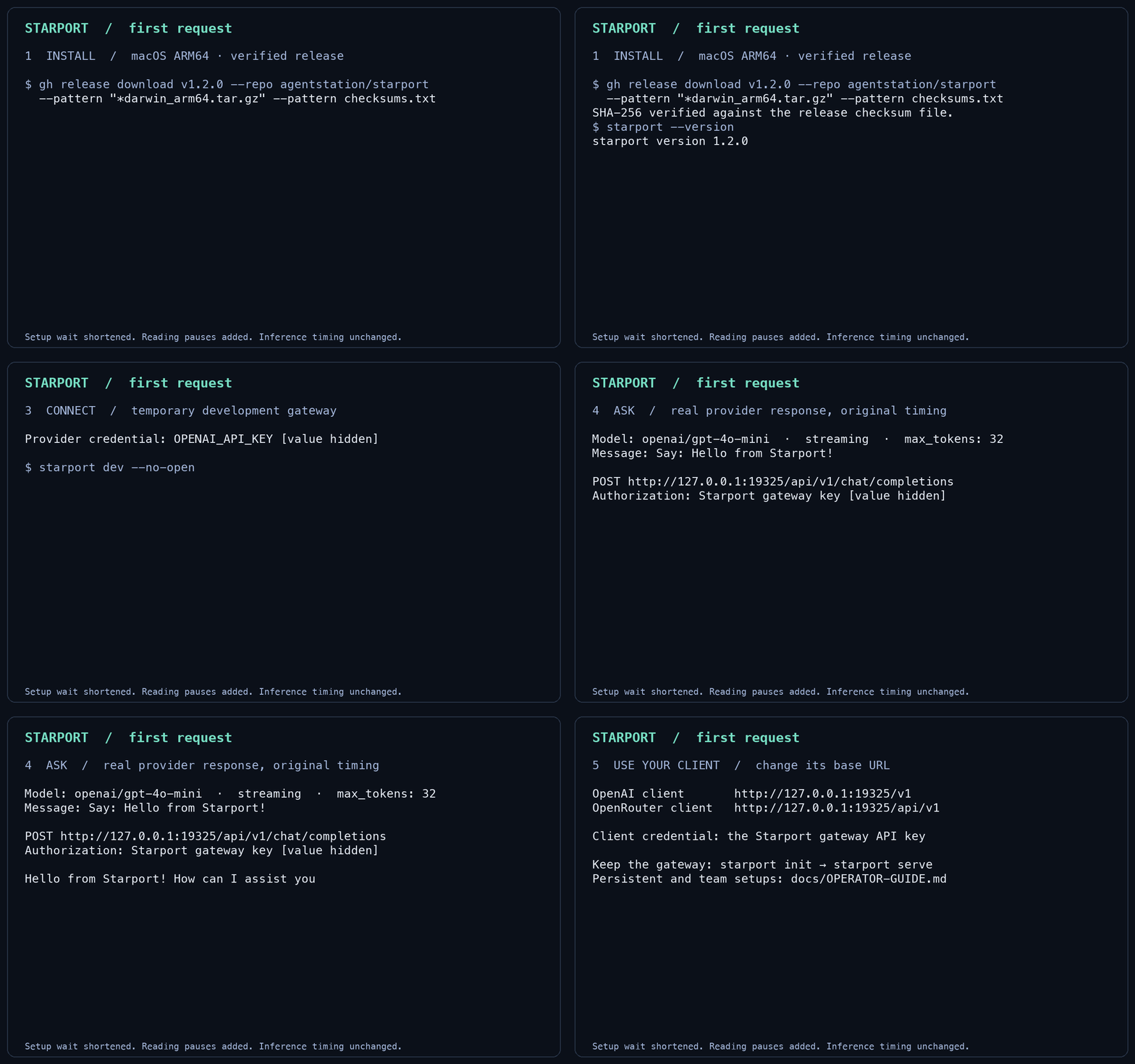
A startup keeps its OpenAI and OpenRouter clients and changes one base URL. The client uses a Starport gateway API key as its API key. The request and response types do not change.
OpenAI /v1 · OpenRouter /api/v1 · One gateway API key
02·API surfaces
Two API families on one listener.
Starport serves the OpenAI-compatible API at /v1 and the OpenRouter-compatible API at /api/v1. The compatibility boundary is the tested routes and SDK versions. Starport does not yet promise a compatibility window.
tableREADME.md
Client contract
Base URL
OpenAI
http://127.0.0.1:8080/v1
OpenRouter
http://127.0.0.1:8080/api/v1
Tested routes · Tested SDK versions · No provider key as a gateway key
03·Credential roles
Three credential roles. None of them interchangeable.
A gateway API key authenticates a client to Starport and carries its scopes and limits. A provider inference credential pays a provider for inference. A catalog-acquisition credential reads a private catalog source and never pays a provider.
Gateway API key · Provider inference credential · Catalog-acquisition credential
04·Catalog
The catalog is a fact source, not a promise.
These commands read the embedded catalog. They need no credential or network access. Catalog presence does not prove that a provider will accept an inference request.
No credential · No network · Membership is not callability
05·First request
A first request streams.
Starport streams the answer as server-sent events, and the last line is data: [DONE]. The first provider request proves whether the provider accepts the credential. Starport records authentication, permission, quota, billing, rate-limit, and service failures.
Server-sent events · data: [DONE] · Provider failures recorded
06·Console
Open the console without pasting a secret.
The starport ui command opens the console with a one-time launch link at any time. The gateway spends the link on first use and exchanges it for a browser session. You paste nothing into the browser.
textREADME.md
Starport development gatewayURL: http://127.0.0.1:8080Authentication: requiredGateway API key (shown once): replace-with-generated-gateway-keyConsole (one-time launch link): http://127.0.0.1:8080/launch?lt=replace-with-ticket
An enterprise adds shared provider inference credentials, BYOK policy, budgets, rate limits, encrypted credential storage, and secret references. Run starport config show to see the effective values without secrets. Run starport config validate to check the same configuration that starport serve loads.
shelldocs/site/configure/index.md
$ starport config show$ starport config validate
BYOK policy · Budgets and rate limits · Secret references
08·Storage
Pick the storage recipe for the process count.
Starport keeps durable state in three roles: KV, SQL, and blob. The local recipe uses Badger, SQLite, and the file system. The shared recipe uses Valkey, PostgreSQL, and object storage.
tabledocs/site/architecture/storage-selection.md
Target
KV
Relational
File bytes
T7 development
In-memory Badger
In-memory SQLite
Scratch directory
T2 persistent local
Badger
SQLite
Local directory
T3 one production server
Badger on a durable volume
SQLite on a durable volume
Local directory on a durable volume
T4 replicated
Valkey
PostgreSQL
Object store
Badger · SQLite · files · Valkey · PostgreSQL · object storage · A cache never holds durable state
09·Production serverQualification open
Deploy to the host you own.
The default Compose file builds one Starport process with persistent Badger, SQLite, and file storage. The Container image install tab verifies the GitHub attestation of the image. Several replicas need the replicated recipe.
shellREADME.md
$ cp .env.example .env$ chmod 600 .env# Edit .env. Set STARPORT_SECURITY_MASTER_KEY and OPENAI_API_KEY.$ docker compose build starport$ docker compose run --rm starport init --configured-storage --name primary-admin$ docker compose run --rm starport auth rotate$ docker compose up -d starport
T3 one production server Available. Single-process recovery tested. Production qualification open.
macOS · Linux · Windows · Attested image · AGPLv3
10·Scale outFailover limits
Scale out behind one load balancer.
Several Starport replicas run behind one load balancer and share one Valkey service, one PostgreSQL database, and one object store. One replica at a time holds the refresh lease and owns provider acquisition, and the other replicas follow the shared accepted head. Each fleet runs in one region, and cross-region replication and multi-region failover are out of scope.
text · Every replicadocs/site/operate-starport/fleet.md
T4 replicated Starport Fleet qualified on Valkey 7.2.14 and PostgreSQL 16.15. Failover limits apply.
One load balancer · One refresh lease · One region
11·On a laptop
Temporary by default. Persistent by choice.
Homebrew installs Starport on macOS and Linux. The starport dev command starts a temporary gateway with in-memory Badger and SQLite, and it removes the gateway state at shutdown. To keep data, run starport init once and then starport serve.